📱 Urban Lunch Mobile App QA Case Study
Mobile Testing with Emulator & Android Studio
📌 Overview
The Urban Lunch Mobile App is designed to allow users to personalize business lunches by combining dishes from multiple restaurants into a single order.
Users can:
- Select a pick-up location
- Choose dishes from different restaurants
- Confirm orders
- Track delivery in real time
This case study focuses on mobile testing using an emulator, with emphasis on:
- Functionality
- Usability
- UI/UX consistency

🧠 Phase 1: Strategic Analysis & Test Design
🧩 Understanding the System
Before testing, I analyzed the app’s workflow based on requirements:
- Pick-up location selection
- Dish selection
- Order confirmation
- Order tracking
To understand the logic, I focused on:
- Step-based user progression (multi-step flow)
- Dependencies between screens
- Validation points (e.g., no dishes selected, missing location)
🧪 Test Design Approach
I designed 45 test cases to ensure full coverage of core features.
Techniques used:
- Equivalence Partitioning (ECP)
- Boundary Value Analysis (BVA)
- Positive & negative testing
Focus areas:
- Dish selection behavior
- Navigation between screens
- Cost calculation logic
- Order tracking flow
- Error handling
🎯 Outcome of Phase 1
- Clear understanding of multi-step mobile flow
- Comprehensive test coverage across features
- Identification of high-risk areas (cost calculation, UI constraints)
🧪 Phase 2: Mobile Testing & Bug Management
📱 Testing Environment
Testing was conducted using:
- Android Studio
- Emulator: Pixel 5 (API 31)
- macOS Sonoma
🔍 Testing Scope
The focus was on validating:
- Restaurant selection and dish ordering
- Order confirmation and tracking
- UI/UX consistency across screens
- Geolocation and pick-up behavior
🧪 Types of Testing Performed
✔ Smoke Testing
- Verified core functionality after build
- Ensured main user flows were working
✔ System Integration Testing
-
Validated interaction between components:
- Restaurant selection
- Order processing
- Tracking system
🐞 Defect Analysis
📊 Test Execution Summary
| Metric | Result |
|---|---|
| Total Test Cases | 45 |
| Passed | 37 |
| Failed | 8 |
| Defects Found | 8 |
📊 Bug Priority Distribution
| Priority | Count | Description |
|---|---|---|
| 🔴 High | 2 | Critical functionality issues |
| 🟠 Medium | 5 | UI and logic inconsistencies |
| 🟢 Low | 1 | Minor issues |
📄 Full test report includes detailed execution metrics, defect analysis, and release recommendation: 👉View Report
🎯 Key Defects Identified
🚨 Missing Delivery Cost in Total Calculation
- Total price did not include delivery cost
- Impact: Incorrect pricing shown to users
- Severity: High
🚨 Missing Delivery Cost Across Screens
- Cost inconsistencies between screens
- Impact: Confusing and misleading user experience
- Severity: High
⚠️ UI Issues with Long Restaurant Names
- Text overlapped or broke layout
- Impact: Poor readability on smaller screens
- Severity: Medium
⚠️ Missing Cooking & Delivery Time Details
- Tracking screen lacked required timing info
- Impact: Reduced transparency for users
- Severity: Medium
⚠️ Weak User Feedback
- No clear feedback when adding items
- Impact: Reduced usability
- Severity: Medium
🧾 Example Bug Report
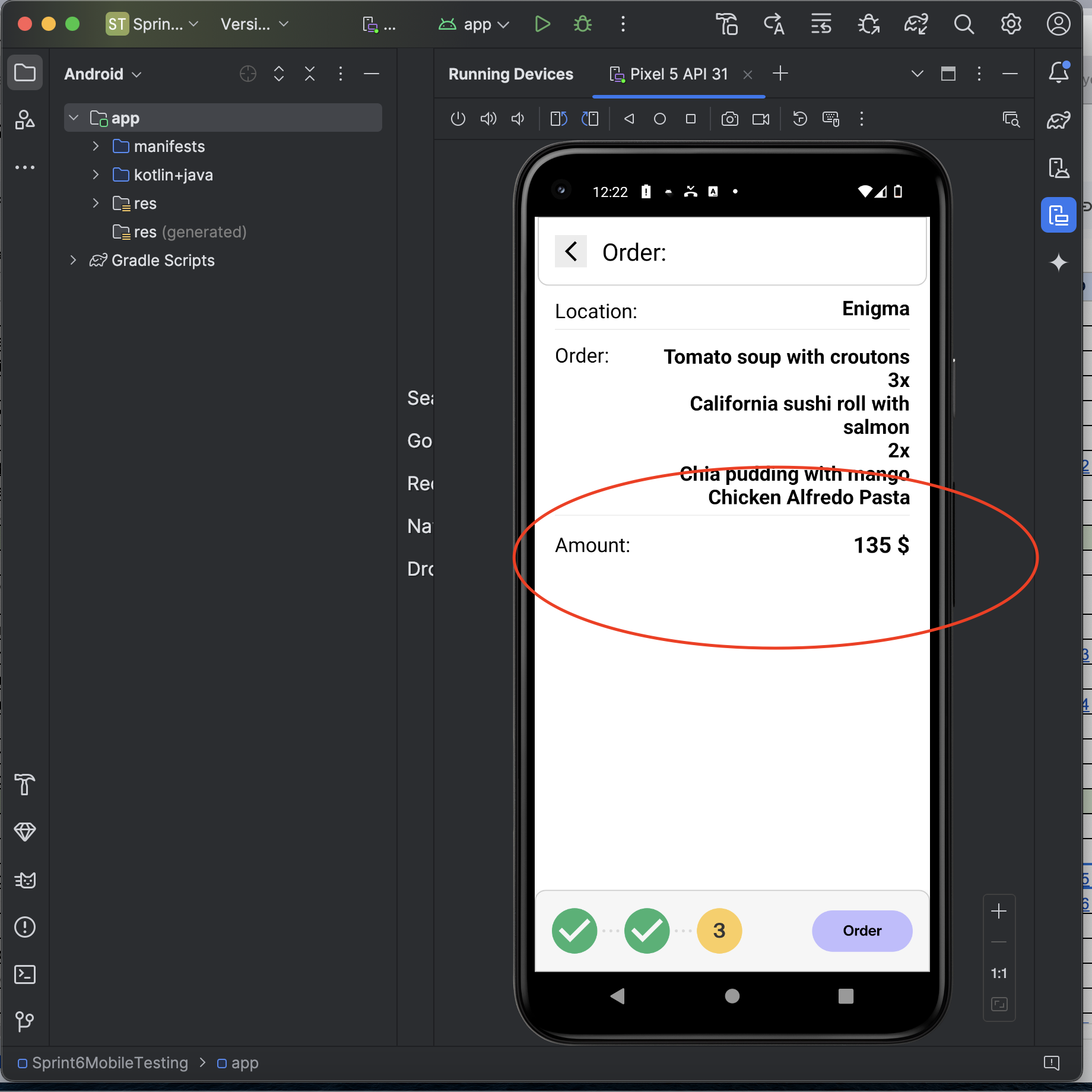
Title: The Order Confirmation screen does not display delivery costs
Description The Order Confirmation screen is designed to show the total amount as the sum of all ordered dishes and delivery costs. However, the delivery cost is missing from the total, causing the displayed amount to be inaccurate. This omission might mislead users regarding the actual cost of their order.
Steps to Reproduce:
- Open the Urban Lunch app.
- Select dishes from various restaurants and proceed to the Order Confirmation screen.
- Observe the total amount displayed.
Expected Result: The total amount should include the sum of all dishes and the delivery costs, ensuring an accurate final total.
Actual Result: The total amount reflects only the sum of the dishes. The delivery costs are not displayed or included in the total calculation.
Priority: 🔴 High
Attachments
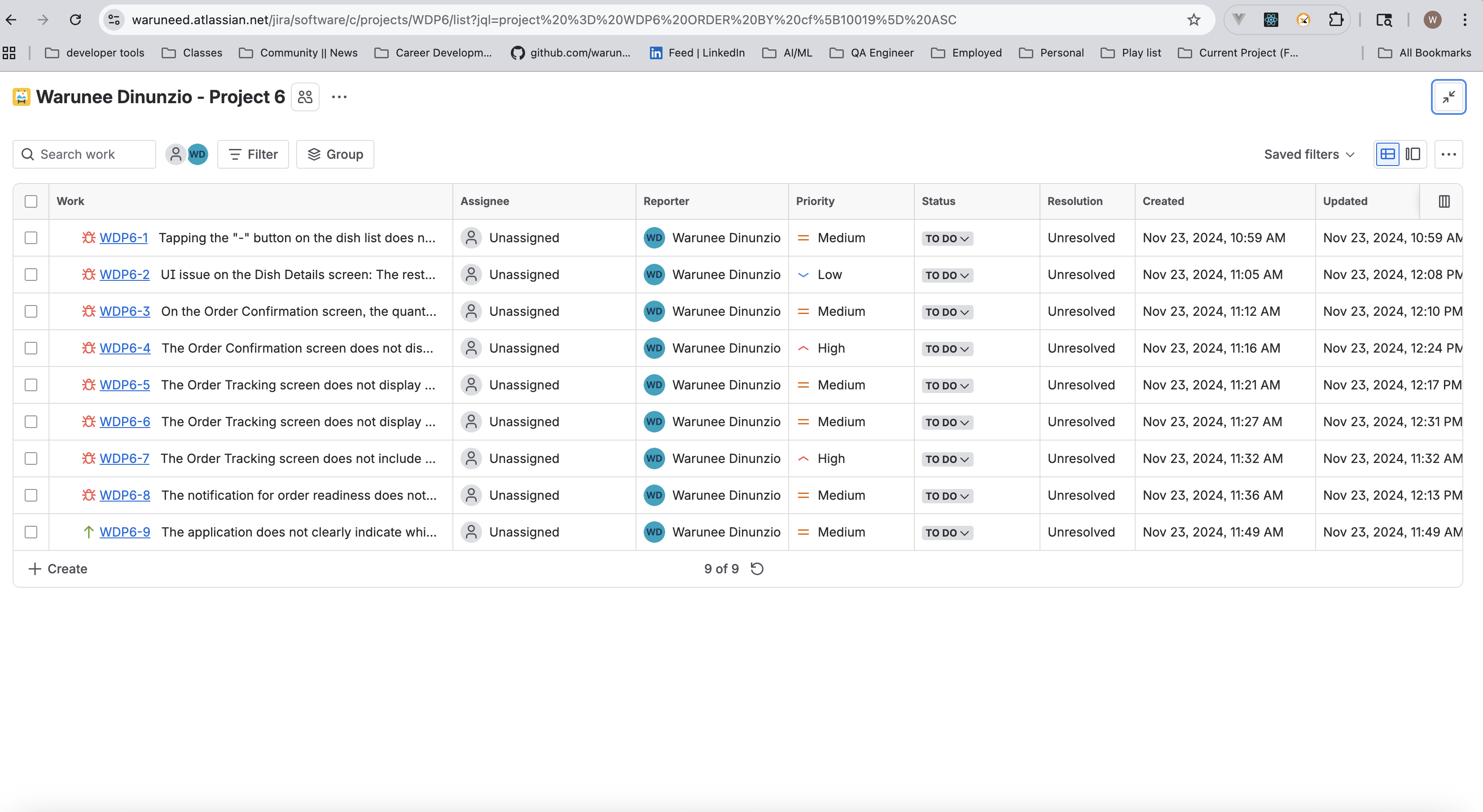
👉 Full bug reports available upon request (tracked in Jira)
📱 Mobile-Specific Insights (Important 🔥)
📏 UI Constraints
- Smaller screens revealed layout issues not visible on web
- Long text required adaptive design handling
📍 Real-World Scenarios
- Geolocation permissions affect usability
- Multi-step flows require clear progress indicators
🧠 User Experience
-
Mobile users rely heavily on:
- Visual feedback
- Clear navigation
- Immediate validation
🎯 Outcome of Phase 2
- Identified critical pricing and UX issues
- Highlighted mobile-specific design limitations
- Provided actionable insights for improving usability and reliability
📊 Results & Impact
- Executed 45 test cases
- Identified 8 defects, including critical calculation issues
-
Improved understanding of:
- Mobile UI constraints
- Multi-step user flows
- Real-device behavior simulation
💡 Key Takeaways
This project strengthened my skills in:
- Mobile application testing using emulators
- Identifying UI issues specific to small screens
- Validating multi-step workflows
- Writing clear and structured bug reports
- Analyzing logs to reproduce and diagnose issues
💬 Reflection
Testing the Urban Lunch mobile app helped me understand how user experience changes significantly on mobile devices compared to web applications.
It also reinforced the importance of:
- Accurate calculations
- Clear UI design
- Strong feedback mechanisms
⭐ Author
Warunee Dinunzio
QA Automation Engineer | Software Engineer
📧 dinunziow@gmail.com
💼 https://www.linkedin.com/in/warunee-dinunzio/